Restaurant platform in Djibouti
Your whole restaurant. One platform.
Digital menu, orders, Click & Collect, delivery, bookings, payments and team management — built for restaurants in Djibouti.
Guided setup by the DJIBMENU team: message us and we configure your restaurant with you.
- Cash
- Merchant QR
- CAC Pay
- Waafi
- D-Money
Orders
Bookings
Deliveries
Orders
The product
One platform, four apps
Customers order from their phone, your team works from theirs, and you run everything from the dashboard.
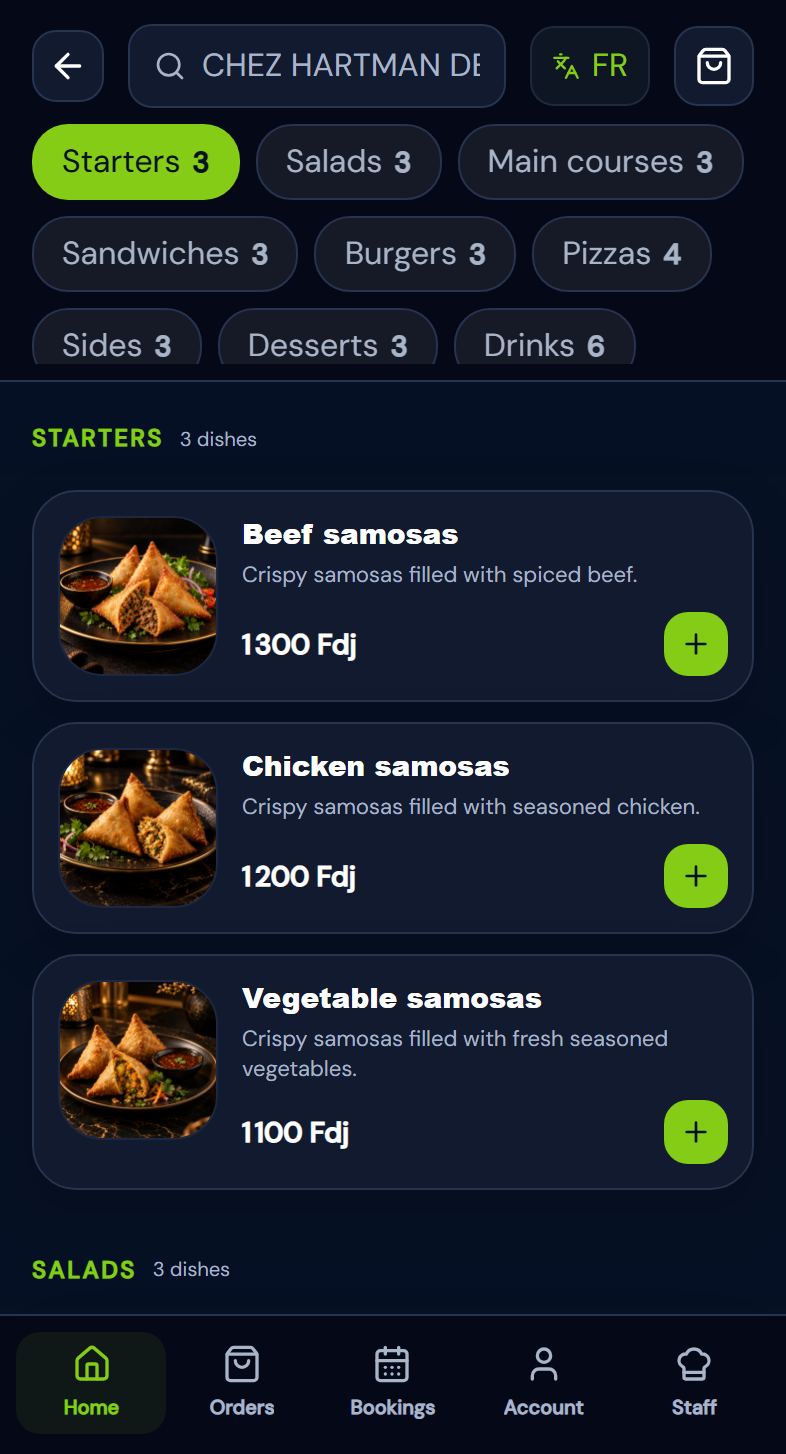
Customer app
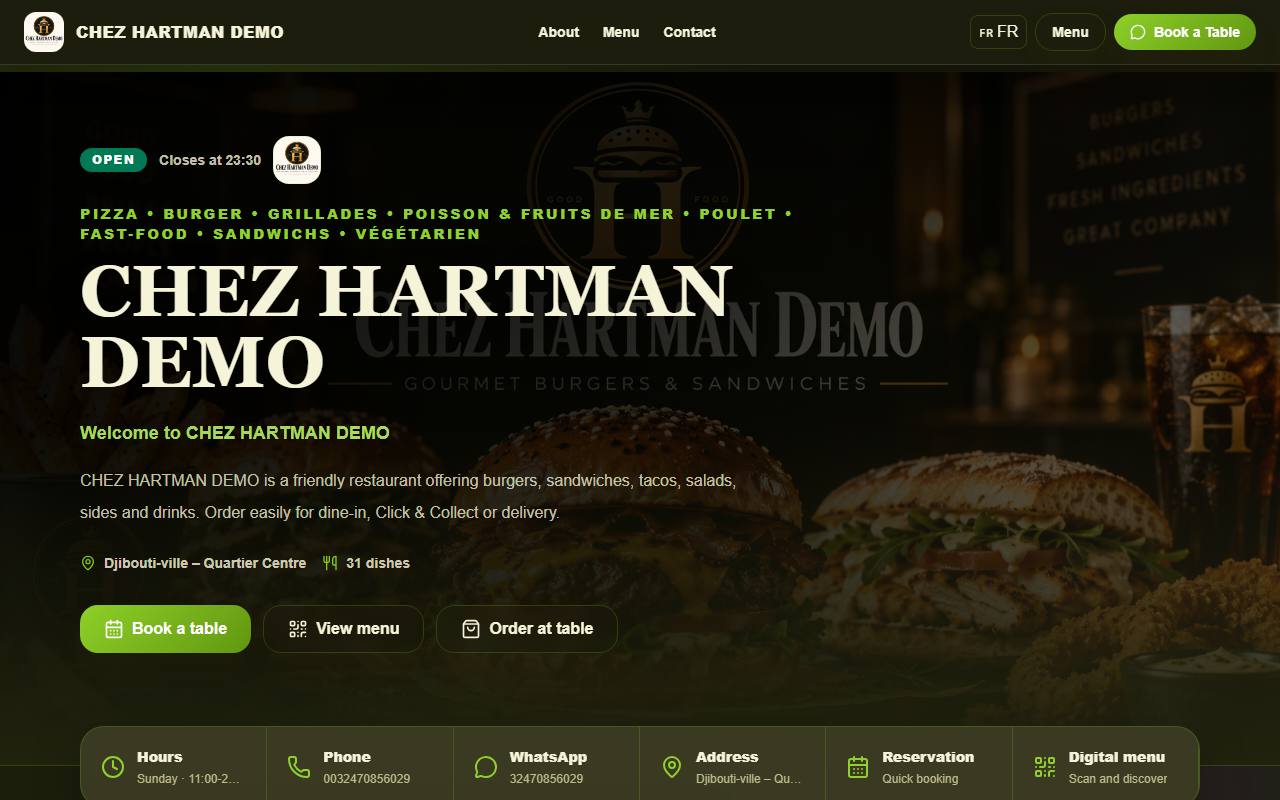
Restaurant website
Dashboard
Orders
Bookings
Deliveries
Orders
Staff app
Staff app
Features
Everything your restaurant needs
Ordering, managing, retaining, getting paid: every step of service has its tool.
Order
Customers order the way they want.
QR menu
An always up-to-date digital menu, opened with a scan, no app to install.
Click & Collect
Takeaway orders with pickup slot and status tracking.
Table ordering
One QR per table: the customer orders, the kitchen receives, the waiter serves.
Delivery
With your own drivers or the DJIBMENU delivery network.
Manage
All of service, without juggling tools.
Dashboard
Orders, revenue, bookings and statistics.
Team
Individual accounts for waiters, kitchen, drivers and managers.
Kitchen
Orders reach the kitchen with their options, then move status by status.
Stock
Track quantities and mark a dish unavailable in one tap.
Categories and products
Dishes, prices, photos and categories; Excel or CSV import and export.
Options
Cooking, sauces, extras: every dish can have its options.
Retain
Give customers a reason to come back.
Customer account
Customers find their orders and bookings.
Promotions
Promotional prices on dishes and highlighted events.
Customer reviews
Ratings and reviews, moderated by the restaurant.
Reservations
Online booking, confirmed from the dashboard.
Get paid
Your customers' payment methods.
Cash
Payment at pickup, at the table or on delivery depending on your setup.
Merchant QR
Customers see your QR, the amount and merchant number, and can copy them.
CAC Pay, Waafi, D-Money
Your local merchant accounts, configured by you.
Payment proof
The customer sends a screenshot, your team checks and confirms.
Click & Collect
Receive takeaway orders directly
Customers order from their phone and pick a time slot. You accept, prepare, and they come to collect.
- Step 1The customer orders from their phone
- Step 2They pick a pickup slot
- Step 3The restaurant receives and accepts the order
- Step 4Preparation, followed live by the customer
- Step 5Pickup at the restaurant
Pickup slot
Pickup code
- New
- Preparing
- Ready
- Picked up
Table ordering
From the table QR to service
Every table has its QR. The customer browses, orders, the kitchen receives, the waiter serves.
- One QR code per table
- Menu with options and extras
- Order sent to the kitchen
- Status tracking until served
- Bill request from the table
Delivery
Deliver with your drivers, or with the DJIBMENU network
Two modes, never mixed: your restaurant picks the one that fits.
Restaurant-managed delivery
Your drivers, your zones and your delivery fees. You assign each run and follow the route.
DJIBMENU delivery network
Drivers from the DJIBMENU network handle your deliveries, once the service is enabled for your restaurant.
Local payments
Djibouti's payment methods, configured by you
Set up your local payment methods and merchant QR directly in DJIBMENU. Customers pay into your merchant account, your team confirms.
- Customers see your merchant QR and the exact amount
- They copy the amount or your merchant code in one tap
- They can download the QR to pay from their app
- They send their payment proof, your team confirms
- DJIBMENU does not verify payments automatically: your team confirms them.
Cash
At pickup, at the table or on delivery.
Merchant QR
Your QR, the amount and your merchant number.
CAC Pay
Your CAC Pay merchant account.
Waafi
Your Waafi merchant account.
D-Money
Your D-Money merchant account.
Amount to pay
Merchant code
Confirmed by your team
Dashboard
Your restaurant at a glance
Orders, revenue, bookings, menu, promotions, team, statistics and deliveries in one place.
- Live orders
- Revenue
- Bookings
- Menu and stock
- Promotions
- Team
- Statistics
- Deliveries
Orders
Bookings
Deliveries
Orders
Staff app
Your team works from their phone
Every member has their own account: orders, tables, kitchen, takeaway and statuses, in real time.
- Orders
- Tables
- Kitchen
- Takeaway orders
- Live statuses
- One account per team member
Staff app
Reservations
A real reservation system
Customers book online, requests land in your dashboard, you confirm. WhatsApp stays available for messages.
- Online booking from your website
- Requests centralised in the dashboard
- Confirmation by the restaurant
- Ready-to-send WhatsApp messages
Reviews and promotions
Bring your customers back
Customer reviews with ratings, moderation, promotional prices and events highlighted on your site.
- Customer reviews with ratings
- Review moderation
- Promotional prices on your dishes
- Events highlighted on your site
Pricing
Simple plans
Choose the plan that fits your restaurant.
Contact us for a quote tailored to your restaurant.
FAQ
Frequently asked questions
Everything to know before you start.
What is DJIBMENU?
A platform for restaurants in Djibouti: website, digital menu, orders (Click & Collect, table, delivery), bookings, team, promotions, reviews and local payments, in one place.
Do I need to install an app?
No. Customers use DJIBMENU from their phone's browser, with no download. Your team too: the staff app opens in the browser and can be added to the home screen.
Can I edit my menu?
Yes, anytime from your dashboard: categories, dishes, prices, photos and options. You can also import or export your menu as Excel or CSV.
How does the QR work?
Each table can have its own QR code. The customer scans it, browses your menu and orders from the table; the order reaches your team and the kitchen.
How does Click & Collect work?
The customer orders from their phone and picks a pickup slot. You accept and prepare the order, the customer follows its status, then comes to collect it.
Can I manage my own drivers?
Yes. You can deliver with your own drivers, or use the DJIBMENU delivery network once it is enabled for your restaurant.
Which payments are accepted?
The ones you set up: cash, merchant QR and local methods such as CAC Pay, Waafi or D-Money. Customers see your QR, the amount and your merchant number.
Does DJIBMENU collect my money?
No: customers pay directly into your merchant account, or in cash to your team. DJIBMENU does not verify payments automatically: your team confirms them.
Can I manage my staff?
Yes: each waiter, cook, driver or manager has their own account, with the access that matches their role.
Can I receive bookings?
Yes: customers book online, the request lands in your dashboard and you confirm it.
Can I temporarily disable a product?
Yes, a dish can be made unavailable in one tap, then re-enabled. You can also track its stock.
Can I customise my website?
Yes: logo, photos, colours, design template, texts, opening hours, promotions and events.
DJIBMENU
Ready to take your restaurant digital?
Let's talk about your restaurant: we guide you through setup and configuration.
Already a DJIBMENU customer? Log in
Request a demo
Leave us your details: the DJIBMENU team calls you back and sets up your restaurant with you.
How it works
From setup to the first order
A guided setup, step by step.
Restaurant creation
Contact us: the DJIBMENU team creates your restaurant space.
Configuration
Details, opening hours, payment methods, team and ordering modes.
Menu import
Enter your dishes or import them from an Excel or CSV file.
Go live
Your website and digital menu become available.
QR codes
Print the QR codes for your menu and tables.
Orders
You receive orders and bookings, your team handles them.